Tampilkan postingan dengan label raspberry pi. Tampilkan semua postingan

Sabtu, 24 November 2012

Raspberry Pi vs MK802

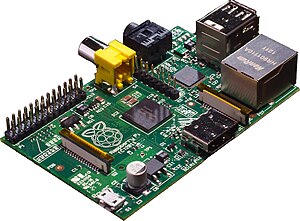
There has been a ton on news in the open source world revolving around the Raspberry Pi. It was one of the first low cost, ARM computers to be targeted at the hobbyist and educational markets. I've owned a Raspberry Pi for many months now and while it does an alright job at playing media files and acting as a small server - for most computing tasks it simply didn't have enough resources available to be useful.

My dedicated x86 media PC I'd been using for some time died a few months back and I had been searching for a low cost replacement for the system - I finally found it in the ARM powered MK802 device.


I've been using the MK802 almost daily for close to a month now and it shocks me that this awesome device hasn't gotten more press in the FOSS world. I plan to write a formal review of the device in the next week, but for now I would like to simply do a comparison between the MK802 and the latest RPI Model B device:


MK802
Raspberry Model B
Processor
1.5ghz
1.0ghz
RAM
1 gig
512 meg
Internal Storage
4 gig
None
USB Ports
One
Two
Networking
Wireless
Wired
Video Out
HDMI Mini
HDMI, RCA
Audio Out
HDMI
HDMI, 3.5m
Storage
Micro SD
SDHC
Size
8.8 x 3.5 x 1.2 cm
8.560 cm × 5.4 cm
Cost+Shipping to US
38.50
43.33

In addition to having superior specs at a lower price point than the RPI Model B, the MK802 also included an HDMI mini to HDMI cord, power adapter, and the device is in a case by default instead of just being a raw board. Needless to say I am impressed with the little device. For those interested in picking up an MK802 I got mine from Amazon here.

~Jeff Hoogland

Selasa, 07 Agustus 2012

Bodhi's ARM Branch Moves to ARMHF

After doing some research and testing for the last week I have arrived at the conclusion that Bodhi's ARM branch will best serve our users by moving our core from Debian Wheezy ARMEL to utilize Debian Wheezy ARMHF. I'm not going to get into the technical difference between the two platforms here - just know that in general ARMHF is faster.

With this change however, there are some slight changes to our ARM repo details. If you have Debian Wheezy ARMHF installed on a device and wish to add the Bodhi repo to your sources the line you want to add is:

deb http://packages.bodhilinux.com/bodhi/ debian stable

Then you just install our bodhi-desktop package as before.

With regards to our officially supported ARM devices, you can find download links to our brand new ARMHF images for the RaspBerry Pi and Genesi Smartbook on our ARM downloads page. Our RaspBerry Pi build is built directly on top of Raspbian and incorporates all of their changes and improvements.


~Jeff Hoogland

Jumat, 03 Agustus 2012

HOWTO: Launch OMXPlayer via a GUI

I'm going to be on an ARM kick for the next two weeks before my fall classes start up. In addition to porting Bodhi to the Pi one of my goals is also to replace my media PC with a Pi. Even though the processor in the Pi is fairly weak, it can decode HD video using it's GPU chip if you use the proper media player. This means that your old favorites like VLC and mPlayer will not work, so we must turn to a tool designed just for the Pi: OMXPlayer.

Now because OMXPlayer is still very new, it is still very basic. So basic in fact it's key bindings (for play/pause/stop/quit) only function if the program is launched via the CLI. Knowing my Fiance and friends who often use the media PC would give me no end of grief if they had to open a terminal to play movies - I set about finding a solution. Today I'd like to share that fairly simple solution with you!

To allow users to simply "double click" on a media file via the file manager and have it open in OMXPlayer you need to create a .desktop file for OMXPlayer. Open a terminal on your pi and run:

sudo nano /usr/share/applications/omxplayer.desktop

For it's contents paste:

[Desktop Entry]
Type=Application
Name=OMXPlayer
Categories=AudioVideo;Player;
Exec=omxplayer -o hdmi %f
Terminal=true
Icon=emblem-video

Save and close the file (ctrl+x in nano) and you should be good to go! When you double click on a media file in your file browser simply select Open With: OMXPlayer! Please note some users have reported this doesn't work with LXDE - I cannot confirm this though as I only use E17 and it works fine there :)

Cheers,
~Jeff Hoogland

Selasa, 31 Juli 2012

Bodhi Linux RaspBerry Pi Beta

Edit/Update: You can find the latest release here -> http://www.bodhilinux.com/downloads_mobile.php

A little over six weeks ago I posted a very early image of Bodhi for the RaspBerry Pi. Today I am happy to let everyone know that I have published what I consider to be a "beta" quality image:


The download comes in the form of a compressed .IMG file, which can be extracted and then written to an SD card (2GB minimum). The first thing worth noting in this release is that the default username/password are different:

Username: pi
Password: bodhilinux

As for changes, this release is now utilizing Terminology as it's default terminal emulator and PCManFM file browser has been replaced with the native EFM (Enlightenment File Manager). The issues our first image had with networking and flash drives should also be resolved with this release. Also worth noting is that the AppCenter is now configured to work by default in the Midori web browser - but the synaptic interface runs fairly slow on the Pi hardware.

Finally - if you have any issues with this image please open a support request in the RaspBerry Pi section of our user forums. That is a much better place to trouble shoot than the comments section on this post.


~Jeff Hoogland

Selasa, 12 Juni 2012

Bodhi Linux ARM Alpha Release for RaspBerry Pi

Edit/Update: You can find the latest release here -> http://www.bodhilinux.com/downloads_mobile.php

I've been busy with lots of different Bodhi things of the late. The latest of my many projects has been getting the Bodhi desktop functional on the RaspBerry Pi:


This first release while having some rough edges does give you a fully functional Enlightenment desktop on top of a Debian Wheezy ARMEL base. I am providing two different downloads which you can find on our source forge page here. The first is an easy to use .img file that can be written to 4GB or larger SD card.

If you dislike .img files I've also provided tar files that contain the boot partition (which should be written to a vfat partition at the start of an SD card) and the root file system (which should be written to the second partition on a card that is extX).

The default logins for this image are:

bodhi/bodhi
root/raspberry

The "bodhi" user has sudo rights by default.

If you hit any snags or find bugs with this image please let us know in the RaspBerryPi section of our user forums (not the comment section of this blog!) so we can improve this release.


~Jeff Hoogland

Rabu, 16 November 2011

One Year with Bodhi Linux

Today marks the one year point from our first Bodhi Linux "0.1.0" release. I feel we have come a long way in such a short time and I am happy with everything the team has accomplished thus far. Would you believe that I first started Bodhi simply because I was tired of having to recompile E on each of my half dozen systems every week?

What has been done in the last year? Well we racked up over 150,000 ISO downloads between source forge and our torrent tracker alone (and over two-thirds of these downloads have been since our 1.0.0 release in March). In addition to disc downloads it would appear more people are actually using Bodhi due to the increase of server traffic (on our main mirror) we have experienced over the last year:


Our forums have also become fairly active. We total almost 30,000 posts now from our 1,600 users.

I would also like to take a moment to thank our community for all the contributions people have made. Our document wiki has been gaining more and more valuable content. It has become a truly great resource.

Beyond this I would like to thank everyone that has contributed a monetary donation. When the Bodhi project first started Ken and I paid out of pocket for all the server costs. Since we opened the door for donations in February we have more than covered our server costs each month. The 150$ our main mirror has cost the last couple months may not seem like much, but it is costly for two students to maintain on their own.

Looking to the future I'd just like to clear up a few release dates and plans our team currently has. First off our next update release (1.3.0) will be out towards the end of December. This will again be something current Bodhi users can easily update their systems to obtain - it's main goal is to keep the LiveCD current. We will continue to have these update releases for our 1.x.y versions until the release of Bodhi 2.0.0

Speaking of Bodhi 2.0.0 - this will be our next "major" release, meaning a full reinstall will be recommended for those wanting to move from the 1.x.y version of Bodhi. 2.0.0 will be re-based on the new Ubuntu LTS 12.04 version. With this version we also plan to add a 64bit version of Bodhi that will have workstations and multimedia production systems in mind. Since Ubuntu 12.04 releases in April expect to see Bodhi 2.0.0 sometime after that, most likely May or June.

While I'm on the topic of new architectures I'd like to also say we will be moving forward with our Debian based ARM build. I'm also excited to announce that Genesi has become a Bodhi Affiliate - meaning we plan to support our ARM build on their hardware once we get a bit further along. We also hope to extend our support to the Raspberry Pi devices as well once they are released.

Thanks for reading and we hope you enjoy using Bodhi!


~Jeff Hoogland